If no bounding box is set, you need to specify the
extreme elements (minimum element and maximum element) first.
Click  to set the extreme elements in the
Cutting Elements dialog box.
to set the extreme elements in the
Cutting Elements dialog box.
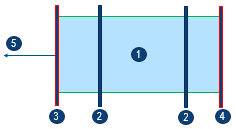
| Leader |
Description |
| 1 |
Volume |
| 2 |
Cutting elements |
| 3 |
Minimum cutting
element |
| 4 |
Maximum cutting
element |
| 5 |
Direction (X or Y or
Z) |
When the bounding box is selected, the extreme elements
and the direction are automatically set when you select the
first cutting element.


 .
.  .
.
 to insert a new line for a cutting family.