What's New

This section describes recent changes in CAPA and Audit Management.

This page discusses:

R2022x FD01 (FP.2205)

Using the Collaborative Space Title Instead of Its Name

Everywhere in Product Line Management where the Collaborative Space value is displayed, the value is now its Title instead of its Name.
Benefits: The user-friendly title of the collaborative space is now displayed instead of the system-generated name.
R2022x GA

Views in Audit Dashboard

You can now lists the projects and expand associated audits to it, related audit findings, finding status and its replies created for the audit using the Project view present in the Audit Dashboard. The earlier Audit view also enhanced to display the Projects column, which lists the comma separated values for the projects associated with each audit. You can use the Filter option to change the view from Audit to Project. The objects that are present in the bookmark or the sub folder of the project must be connected to the audit as audit items. Only such projects are listed in the Project view, which can be expanded to view the corresponding audits. For more information, see Audit Dashboard.

Benefits: You can use these views in the Audit Dashboard where all the projects are listed with the audits linked to each project. It also enables navigation from the projects to all the (audit, audit finding, finding status, and audit reply) objects from the dashboard.
Creating a Finding Status
You can now create a finding status from the Finding Status page. You can create a new finding status object only if all the existing finding status objects are closed. You can also delete the finding status objects that are in the Open state. For more information, see Creating a Finding Status.
Creating a Reply
You can now create a reply for the selected finding status object that is in the Resolution state. The Create Reply option is present in the Actions column of the Dashbaord for Audit page. You can also delete the replies that are in the In Process state. For more information, see Creating a Reply.
Audit Dashboard in the Audit Home Page
You can now view all the audits, related audit findings, finding status and its replies created for the audit under the Dashboard tab present in the Audit Home page. You can create Audit, Audit Finding, Finding Status, and Reply from the Dashboard. You can also add tasks, related items and reference documents created for the Audit, Audit Finding, Finding Status, and Reply using the Dashboard tab. For more information, see Audit Dashboard.
Generating an Audit Report
You can now create an audit report with report type as official and draft in the pdf format. The official report includes all the findings and finding status objects that are validated and in the Resolution state in its lifecycle. It also includes the replies that are validated and in the Completed state. When you click the Official Report option from the toolbar of the Audit Report page, the report is generated and added as reference documents to the context audit report. You can also create a draft report using the Draft Report option and this report includes all the findings, finding status objects, and replies. For more information, see Audit Reports.
Audit and Audit Finding
You can now create Public and Private discussions for the Audit and Audit Finding using the Discussions category. You can also create a revision of the Audit and Audit Finding using the Revisions category. For more information, see Opening an Audit and Finding Sections.
Snapshots for Audit
You can now create a snapshot for the selected audit and use it to comapre with details of the different audits. For more information, see Snapshots.
Creating Subtypes
You can now create a subtype for the audit, finding, reply, status, and schedule using the Create New Sub Type page from the Data Model Customization app. The user assigned with the Administrator role can create a custom subtype.
Selecting Subtypes
You can now select the subtypes for audit, finding, reply, status, and schedule while creating these audit objects. When you select the type of objects, you can also select the subtype of the context object. For more information, see Creating an Audit.
Creating Deployment Package
You can now create a deployment package for the audit, finding, reply, status, and schedule using the Data Model Customization app. The user assigned with the Administrator role can create a custom subtype.
Selecting an Owner
You can now select an owner for an audit and audit template using the Owner option present in the Create Audit and Create Audit Template pages. The Search results list the owners that are created under the organization and added to the collaborative space, which the context user is used to create the audit and audit template. For more information, see Creating an Audit and Creating a Template.

Renamed Product Line Management Object Maturity States

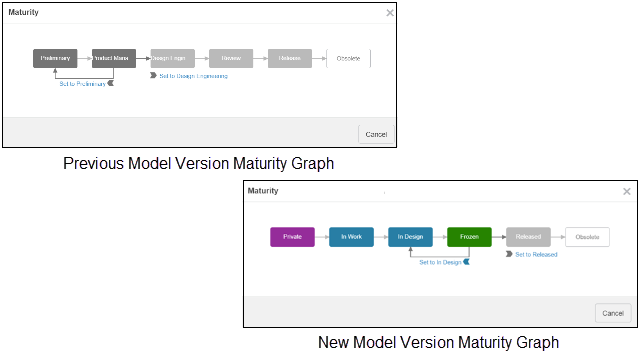
The maturity states for model versions and configuration rules have been renamed and all maturity states have been assigned colors in the maturity graph.

Previous Model Maturity States New Model Maturity States
Preliminary Private
Marketing Marketing
Review Review
Active Active
Inactive Obsolete

Previous Model Version Maturity States New Model Version Maturity States
Preliminary Private
Product Management In Work
Design Engineering In Design
Review Frozen
Release Released
Obsolete Obsolete

Previous Configuration Rule Maturity StatesNew Configuration Rule Maturity States
Preliminary In Work
Release Released
Obsolete Obsolete
Expression rules and matrix rules use the Configuration Rule maturity states.


Benefits: The new maturity state names for model versions and configuration rules and the colored state nodes in maturity graphs make it easier to understand the current and possible lifecycle states of these objects.
For more information, seeContent Lifecycles

Removal of Product Line Management App-Specific Roles

Several app-specific roles are no longer available on the cloud by default.
The following roles are no longer available on the cloud by default:
  • Global User
  • Marketing Manager
  • Product Manager
  • Product Planner
  • Sales Engineer
All baseline access roles are still supported, and can be assigned, on premises and on the cloud.
Benefits: By default, only baseline access roles that can be assigned are available on the cloud.
For more information, seeProduct Line Management Access to Content